Real-World Deployment (real branch)
This section lists the Real-World Deployment of the Patrolling Trash-Collecting Robot project, organized by functionality. For system overview and environment setup, see the Project Introduction.
cd ~/rsp_ws/src/rsp-project-team-emrs
git checkout real   # for real robot
Hardware and Drivers
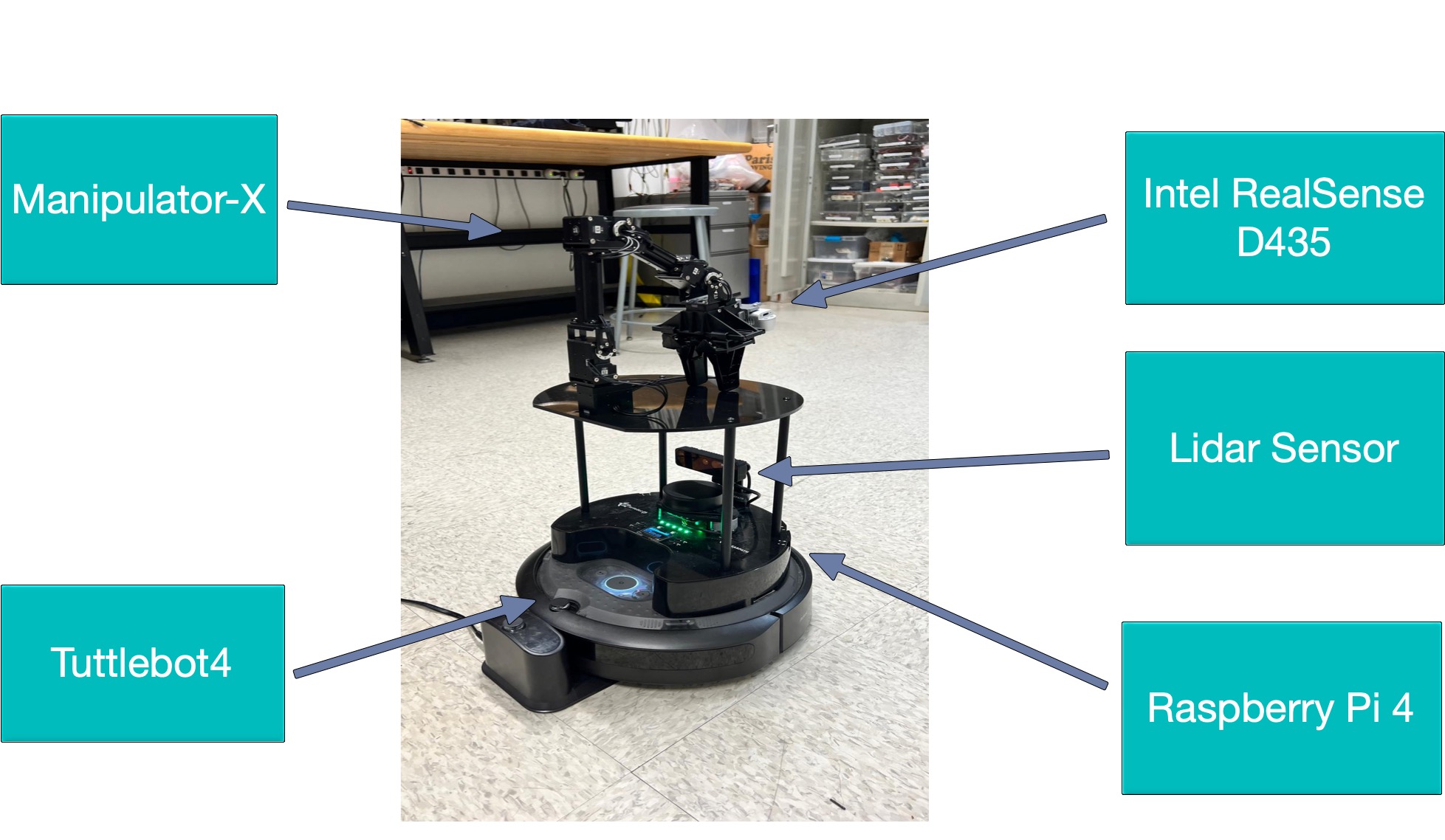
Description: Integration on TurtleBot4 with OpenManipulator-X, LiDAR, RealSense.
Driver Nodes:
turtlebot4_node: ROS2 driver for Create3 base
open_manipulator_node: controller for arm joints
Sensor drivers for LiDAR and RealSense
Setting of USB3.0: We used USB 3.0 for the OAK-D and RealSense cameras to handle the high bandwidth needed for streaming RGB and depth data at full resolution and frame rate—something USB 2.0 couldn’t support without frame drops. Since the Raspberry Pi couldn’t supply enough power to run both cameras and the robot arm, we added a separate external power supply for the arm to ensure stable performance without overloading the Pi.
TurtleBot4 Setup
Warning
Make sure the Turtlebot4 is in Access Point (AP) mode with namespace “emrs”, following the instructions in https://turtlebot.github.io/turtlebot4-user-manual/setup/basic.html.
Connect to the Turtlebot4 network and access the Create3 webserver through the Raspberry Pi’s ip address and port 8080.
example: 192.168.28.24:8080
Follow the instructions here (https://turtlebot.github.io/turtlebot4-user-manual/setup/discovery_server.html) to set up Discovery Server on the Turtlebot4 and get its topics on your own PC.
SLAM - Generating a map
Check that you can see the Turtlebot4 topics on your PC by running
ros2 topic list
You should see topics multiple topics with prefix “emrs”. If you do not, check that you are connected to the AP network, run “source /etc/turtlebot4_discovery/setup.bash”, “ros2 daemon stop”, and “ros2 daemon start”. Check the topic list and ensure that they are being published to by echo-ing or checking the hz. Finally, you can run the following command:
ros2 launch turtlebot4_navigation slam.launch.py namespace:=emrs
ros2 launch turtlebot4_viz view_robot.launch.py namespace:=emrs
Connect the teleop controller and drive the robot around the room, making sure the map on Rviz is continuously growing. Once satisfied with the map, save it by calling
ros2 run nav2_map_server map_saver_cli -f "map_name" --ros-args -p map_subscribe_transient_local:=true -r __ns:=/emrs
And move the pgm and yaml file to the maps folder in the turtlebot4_manipulator_navigation package.
Hand-Eye Calibration (real branch)
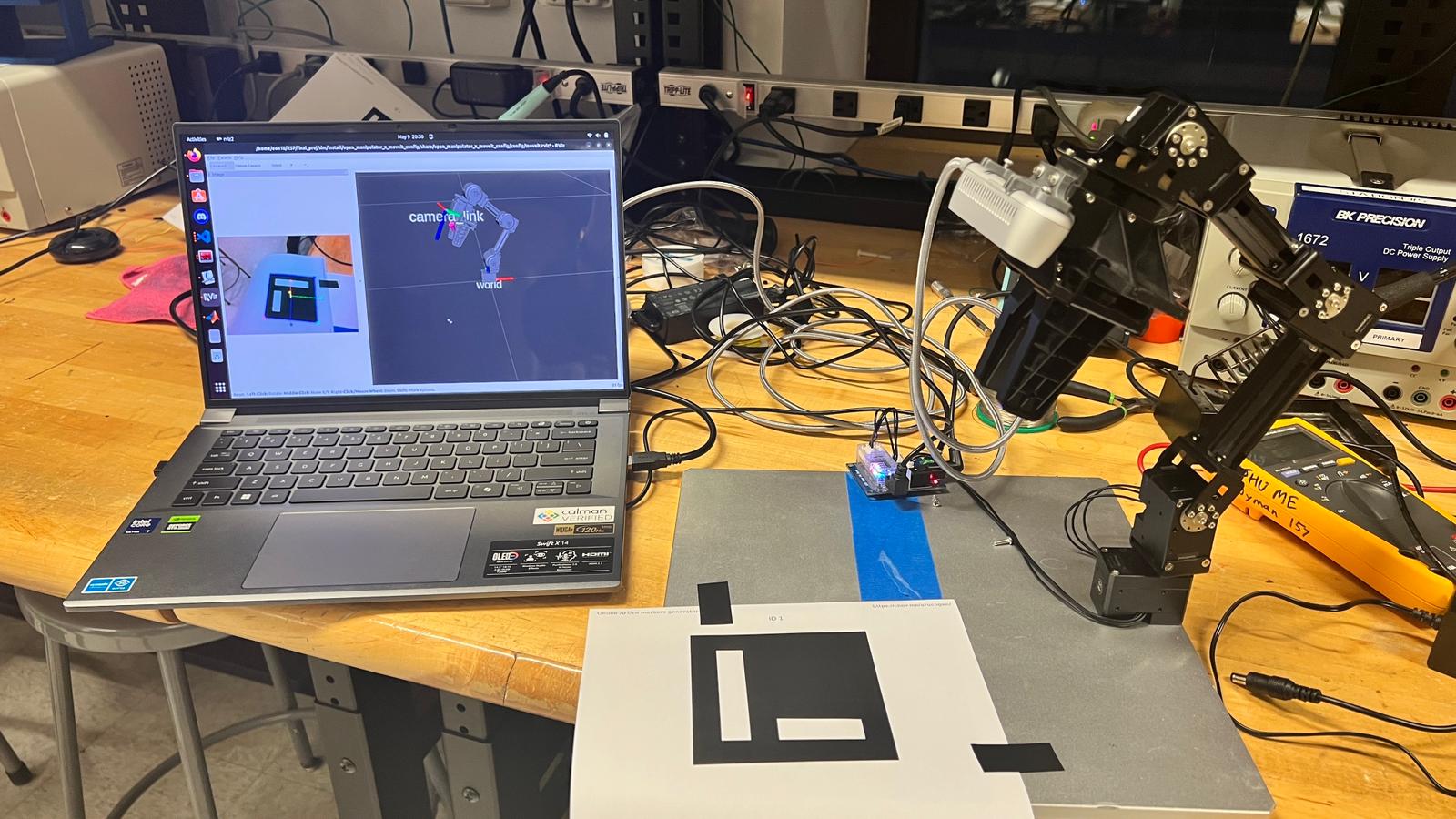
Description: We use the same way from ASBR to calibrate end-effector to camera transform using MoveIt calibration pipeline and ArUco board.
Procedure: 1. Launch calibration pipeline via MoveIt. 2. Capture marker poses and compute transform. 3. Publish static TF with static_transform_publisher.
Launch Command:
cd ~/rsp_ws/src/rsp-project-team-emrs
git checkout real
matlab -nodisplay -nodesktop -r "run('~/rsp_ws/src/rsp-project-team-emrs/hand_eye_calib/matlab/hand_eye_calib.mlx')"
ArUco Detection and Approaching
Description: The robot uses computer vision to detect ArUco markers attached to trash objects and navigates to optimal picking positions.
Detection System:
Primary detection with OAK-D camera mounted on the robot base Secondary precise detection with RealSense D435 on the arm for pick operations Real-time pose estimation of trash objects relative to the robot
Approaching Procedure:
During patrol, the robot scans the environment for ArUco markers Upon detection, the robot stops and calculates the optimal approach position Robot navigates to position itself within arm’s reach of the trash object Fine positioning adjustments ensure the object is within the arm’s workspace
Launch Commands:
ros2 launch turtlebot4_manipulator_navigation navigate.launch.py
The above launch file sets up nav2, aruco detection and approach action servers.
ros2 action send_goal /emrs/approach_trash turtlebot4_trash_actions/action/Approach "{marker_frame: 'marker'}" --ros-args -r /tf:=/emrs/tf -r /tf_static:=/emrs/tf_static --remap __ns:=/emrs
The above command can be run for testing which sends goal to action server that starts the approach action. The whole pipeline can be run using trash_collection_task.py which undocks the robot and starts the complete pipeline.
Pick and Place
Description: MoveIt2-based pick-and-place functionality for trash collection.
Launch Command:: To run the pick and place action, ssh into the Turtlebot4 by running:
ssh -X ubuntu@10.42.0.1
replacing “10.42.0.1” with the ip address shown on the Turtlebot4 screen. Repeat this for a total of three terminals each ssh’ed into the robot. Check which USB port the arm is plugged into by running:
sudo dmesg | grep tty
and then add permissions,
chmod 666 /dev/ttyUSB0
replacing “/dev/ttyUSB0” with whatever port name you have. Also run
groups
and see if the user is in the “dialout” group. If not, run:
sudo usermod -aG dialout $USER
Then start the open-manipulator-x arm by running the following command, making sure to physically hold the robot arm near its home configuration before doing so:
ros2 launch open_manipulator_x_bringup hardware.launch.py port_name:=/dev/ttyUSB0
Note
The motors should engage and you may then let go of the arm. If there are errors, it is most likely because of the port name being wrong or permissions not being applied (may need a reboot). Then, in another terminal, run:
ros2 launch open_manipulator_x_moveit_config move_group.launch.py
Finally, run:
ros2 launch pick_place pick_place.launch.py
to see a pick and place action.
Trash Actions - Approach, Pick, and Place
Approach
This action will search for an ArUco tag in the view of the OAK-D camera on the Turtlebot4 and travel in front of it to put the Open Manipulator-X arm in range of the trash object. It uses the Approach.action interface:
string marker_frame        # TF frame of the detected ArUco marker
bool success
string message
---
float64 distance_to_goal
with the goal “marker_frame” as the name of the frame outputted by the ArUco detection node. This is usually “marker”.
Pick
This action will search for the ArUco tag of the trash object in the view of the RealSense D435 camera mounted on the Open Manipulator-X arm and will move the arm to pick up the trash object. It uses the Pick.action interface:
string marker_frame        # TF frame of the detected ArUco marker
---
bool success
string message
---
float64 distance_to_goal
with the goal “marker_frame” as the name of the frame outputted by the ArUco detection node. This is usually “marker_arm”.
Place
This action will move the arm with the trash object to the trash can, opening the gripper and depositing the trash inside. It uses the Place.action interface:
geometry_msgs/PoseStamped trash_pose
---
bool success
string message
---
float64 distance_to_goal
with the goal “trash_pose” as the pose of the arm above the trash can.